How to order
Follow these steps to choose and buy products from our online store:
- Browse the store: Use the menu to explore categories such as Workwear, Personal protective equipment and Work footwear.
- Use search: If you know what you need, use the magnifying glass at the top of the page to find it quickly.
- Read the product details: Open a product to view its description, images, available sizes and colours.
- Choose your options: Select the size, colour and any other options before adding the item to your basket.
- Add to basket: Click “Add to cart” once you have selected your options.
- Review your basket: Click the basket icon in the top-right corner to change quantities or remove items.
- Proceed to checkout: When you are ready, click the checkout button.
- Sign in or create an account: Returning customers can sign in. New customers can create an account or continue as a guest.
- Enter your delivery details: Provide your name, delivery address and contact details, then select a delivery method.
- Choose a payment method: Select how you wish to pay and provide the required information.
- Review and place your order: Check that all details are correct, then confirm your order to complete the purchase.
You will receive an order confirmation by email. Delivery information will be provided once your order has been dispatched.
Let customers speak for us
Labai patogūs darbiniai batai,kuriuos galima
Labai patogūs,lengvi darbo batai,kuriuos galima naudoti ir žygiams.
Vaidas K.

Geri batai už puikią kainą
Geri batai už puikią kainą 👌
Tomas S.

Už tokia kaina labai geros, patogios,
Už tokia kaina labai geros, patogios, neslystančios klumpės.
Arturas R.

Puikiai!Esu patenkinta isigyta preke
Puikiai!
Esu patenkinta isigyta preke.
Jurgita R.

Kai sunešiosiu, pirksiu
Kai sunešiosiu, pirksiu kitą
zenonas k.

👍👍👍👍
👍👍👍👍
Darius S.

Gera kokybė
Gera kokybė.
Anonimas
Lengvi, patogūs ir labai gražūs
Lengvi, patogūs ir labai gražūs.
Deimantas K.

Šiltas, gražus, patogus
Šiltas, gražus, patogus.
Deimantas K.

Pirkta siaurai kojai, labai tiko ir patiko
Pirkta siaurai kojai, labai tiko ir patiko 😊
Deimantas K.

Patogus,
Patogus, šiltas,
Gintaras Š.

👌
👌
Audrius D.

Gera kokibiška prekė.
Jurijus T.

Geri, kokybiški pašiltinti guminiai batai. Esant žemesnei temperatūrai lauke, vėsoki
Geri, kokybiški pašiltinti guminiai batai
Anonimas

Išmera permaža vienu numeriu
Išmera permaža vienu numeriu.
Jan J.

Greitas pristatymas malonus, profesionalus bendravimas, ateityje tikrai sugryšiu
Lb siltos ir tvirtos darbinės kelnės
Dėkojame, Gryta, kad pasidalinote savo nuomone! Džiaugiamės, kad kelnės Jums patinka. Jei reikės daugiau prekių, susisiekite su mumis :)
Dekoju uz operatyvuma ir auksta paslaugos kokybe. Malonu bendrauti. Uzsakyti batai tikrai puikus!
Puiki patirtis.
Dėkojame už nuostabius žodžius! Džiaugiamės, kad jūsų patirtis buvo puiki. Visada laukiame jūsų atsiliepimų ir tikimės jums dar kartą padėti!
Vienintelis minusas, kurį "patobulinau" - kelnių apačioje tiesiog įsiuvau užtrauktukus, kad būtu patogesnis tiek užsidėjimas, tiek nusiėmimas. Visa kita geros kokybės, funkcionalios, patogios "eksploatacijos" metu.
Ačiū, Andriau, už Jūsų atsiliepimą! Džiaugiamės, kad prekė Jums patinka ir vertinate jos kokybę bei funkcionalumą. Jūsų pasiūlymas dėl užtrauktukų bus apsvarstytas tolimesniam tobulinimui. Gražios dienos!
Super kelnes darbui, jos neplacios bet elastingos, atlaike du metus. Nusipirkau vel tokias pacias. Geras kainos ir kokybes santykis.
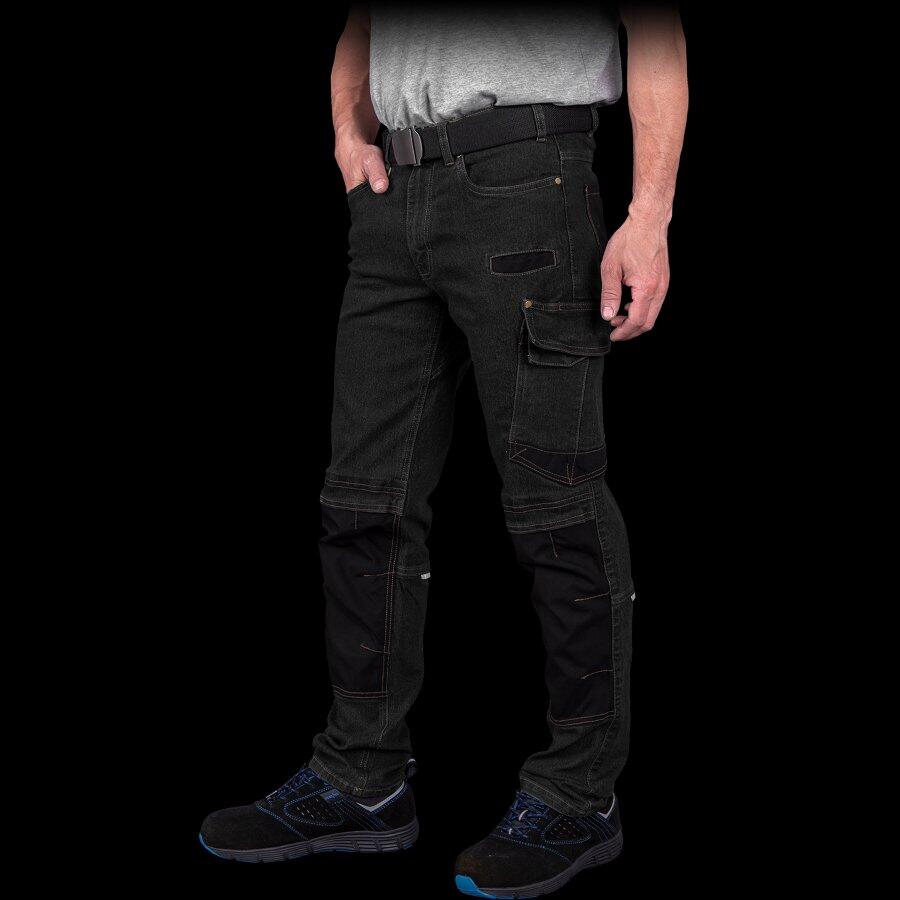
Viskas gerai
Sveiki,
Dėkojame už atsiliepimą! Linkime gero dėvėjimo bei lauksime Jūsų sugrįžtant!
Linkėjimai, Dudu.lt Darbo Apranga
Super kelnės! AČIŪ
Sveiki,
Dėkojame už atsiliepimą! Džiaugiamės, kad kelnės atitiko Jūsų lūkesčius. Linkime gero dėvėjimo bei lauksime Jūsų sugrįžtant!
Linkėjimai, Dudu.lt Darbo Apranga
Labai patiko.
Sveiki,
Dėkojame už atsiliepimą! Džiaugiamės, kad prekė atitiko Jūsų lūkesčius. Linkime gero dėvėjimo bei lauksime Jūsų sugrįžtant!
Linkėjimai, Dudu.lt Darbo Apranga
Atitiko lūkesčius
Sveiki,
Dėkojame Jums už atsiliepimą! Lauksime Jūsų sugrįžtant!
Linkėjimai, Dudu.lt Darbo Apranga
patirtis su DUDU.LT gera niekas nestrigo- veikia esu patenkintas.
Sveiki,
Dėkojame Jums už atsiliepimą! Lauksime Jūsų sugrįžtant!
Linkėjimai, Dudu.lt Darbo Apranga
Viskas puiku
Sveiki,
Dėkojame Jums už atsiliepimą! Linkime gero dėvėjimo bei lauksime Jūsų sugrįžtant!
Linkėjimai, Dudu.lt Darbo Apranga
Patiko uzsisakysiu dar neviena karta🙂
Sveiki,
Dėkojame už atsiliepimą! Lauksime Jūsų sugrįžtant!
Linkėjimai, Dudu.lt Darbo Apranga
Puiki avalynė
Sveiki,
Dėkojame už atsiliepimą! Linkime gero dėvėjimo bei lauksime Jūsų sugrįžtant!
Linkėjimai, Dudu.lt Darbo Apranga
Man patiko, kad greitai vietoje radau paprasta virejo skarelę, už nedidelę kaina.
Sveiki,
Dėkojame už atsiliepimą! Džiaugiamės, kad likote patenkinta mūsų preke. Linkime gero dėvėjimo bei lauksime Jūsų sugrįžtant!
Linkėjimai, Dudu.lt Darbo Apranga
⭐⭐⭐⭐⭐
Sveiki,
Dėkojame už atsiliepimą! Lauksime Jūsų sugrįžtant!
Linkėjimai, Dudu.lt Darbo Apranga
Puiki parduotuve
Sveiki,
Dėkojame už atsiliepimą! Lauksime Jūsų sugrįžtant!
Linkėjimai, DUDU.LT Darbo Apranga
Kombinezonas Jimmy S dydis yra tikrai per didelis ant S. Į jį tilpo 182cm vyras. Ir prie produkto dydžių lentelė visai apie nieką.
Gausus pasirinkimas, prekės kokybiškos. Paskambinus, labai gerai konsultuoja, pataria dėl dydžio renkantis. Dėkoju Jums už puikų aptarnavimą.
Laba diena,
Dėkojame už atsiliepimą! Džiaugiamės, kad likote patenkinta tiek aptarnavimu, tiek prekėmis. Linkime gero dėvėjimo bei lauksime Jūsų sugrįžtant!
Linkėjimai, Dudu.lt Darbo Apranga
Puikus pirkinys!!! Tokios kokybės reikia gerai paieškoti!!! Super!
Sveiki, dėkojame už atsiliepimą! Džiaugiamės, jog prekė atitiko Jūsų lūkesčius! Lauksime Jūsų sugrįžtant!
Linkėjimai, Dudu.lt Darbo Apranga